

How to Design an AI-Ready SaaS Architecture Without Killing Your P95 Latency
You have a working SaaS product. You have decided — correctly — that AI features are the next competitive frontier. Your roadmap includes an LLM-powered assistant, a RAG-based knowledge search, a semantic recommendation engine, and maybe an autonomous agent or two.
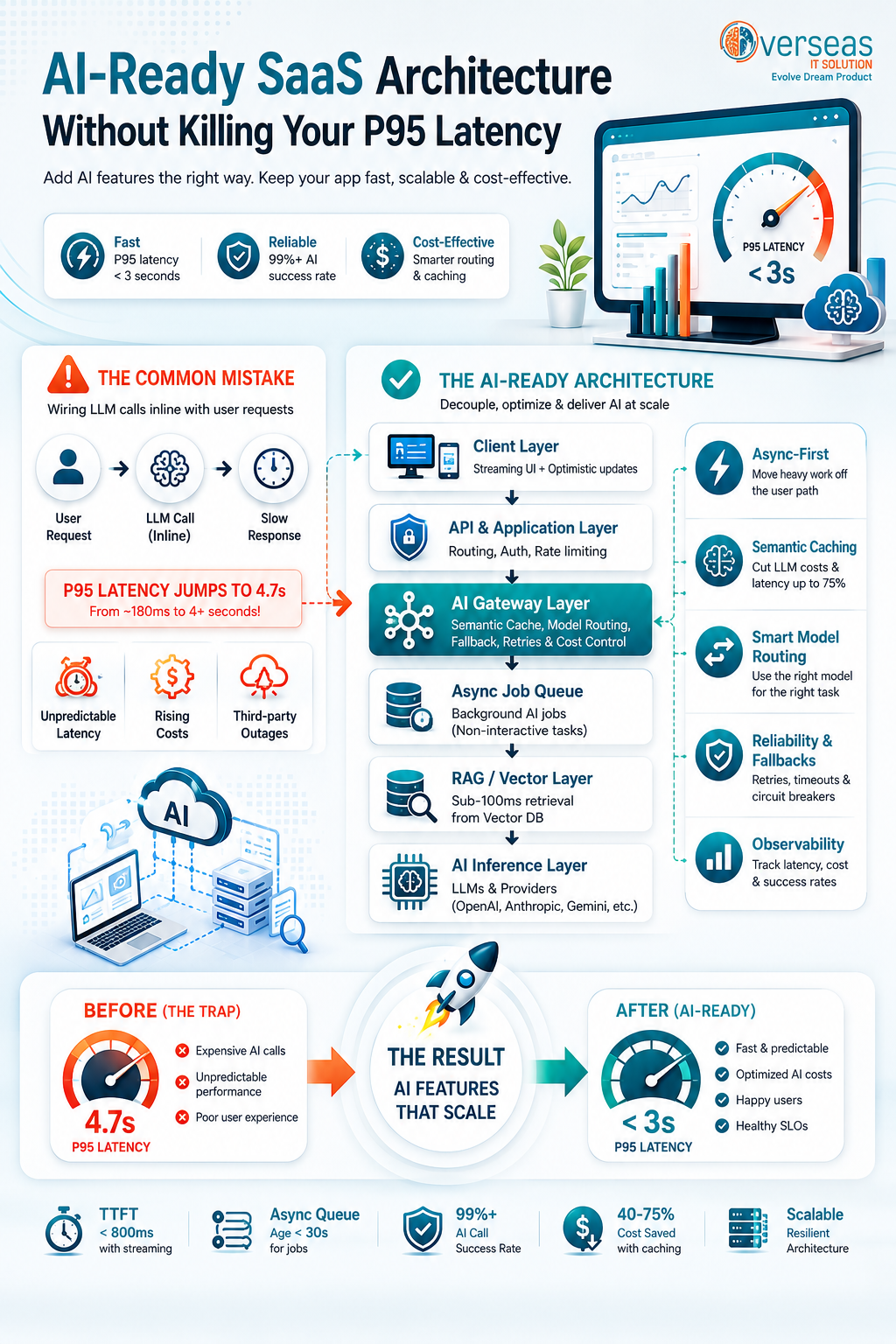
Then you wire up your first LLM call inline with a user request. The response comes back. It takes 4.2 seconds. Your P95 latency, previously a respectable 180ms, is now 4.7 seconds. Your SLOs are in flames.
This is one of the most common architectural mistakes SaaS engineering teams make when adding AI capabilities: treating AI inference as just another synchronous API call, bolted on to an existing request pipeline that was never designed for it.
This article is a practical engineering guide to designing an AI-ready SaaS architecture that embraces the power of LLMs, RAG, embeddings, and agents — without destroying the latency characteristics that your users and SLOs depend on.
Industry Benchmark
Best-practice SLOs for AI-enabled SaaS in 2025: P95 latency under 3 seconds for interactive AI chat, queue age under 30 seconds for async AI jobs, and a 99% success rate for all AI calls. Most teams add AI features without defining these targets first — which is why they discover the problem in production.
1. Why AI Workloads Are Architecturally Different
Before diving into patterns, it is worth understanding what makes AI workloads fundamentally different from the request types your existing SaaS architecture was designed to handle.
1.1 Non-Deterministic Latency
A database query has broadly predictable latency. An LLM call does not. Output latency scales with the number of output tokens generated, which varies based on input complexity, model temperature, and whether the model decides to reason step by step. A call that returns a two-sentence answer might take 800ms. A call that returns a detailed multi-paragraph analysis might take 12 seconds for the same underlying request.
1.2 High and Variable Cost
Every LLM token costs money. A synchronous chain where User Request → LLM Call → Response means every user interaction directly drives inference cost. Without cost controls in the architecture — caching, batching, model routing — AI features that seem affordable in demos can bankrupt a product at scale.
1.3 External Dependency on Third-Party Infrastructure
Unless you are running self-hosted models, your AI calls go through a third-party API — OpenAI, Anthropic, Google Gemini, or a cloud inference endpoint. These services have rate limits, occasional outages, and cold-start latencies. Your architecture must treat the AI inference layer as an unreliable external dependency, not a reliable internal function.
1.4 Memory-Bound and Compute-Bound in Different Phases
LLM inference has two distinct phases with different performance profiles. The prefill phase (processing the input prompt) is compute-bound and can be parallelised. The decode phase (generating output tokens one at a time) is memory-bound and sequential. This means that P95 latency is dominated by output length — something you often cannot control. Tracking Time to First Token (TTFT) separately from end-to-end latency is essential for understanding user experience.
The Core Mistake
Wiring an LLM call inline with a synchronous user-facing request is the single most common architectural mistake in AI-enabled SaaS. It couples your user-facing P95 latency directly to LLM inference latency — which you do not control. Every other pattern in this article flows from avoiding this mistake.
2. The AI Request Classification Framework
Not all AI calls are equal. The first architectural decision is classifying your AI workloads by latency tolerance and user experience requirements. This classification drives every subsequent design decision.
| Class | Example | Latency Budget | Approach | P95 Target |
|---|---|---|---|---|
| Synchronous Interactive | AI chat reply, autocomplete, inline suggestions | < 3 seconds | Stream tokens; optimise TTFT | < 3s |
| Near-Real-Time Enrichment | Sentiment tagging, intent classification | < 10 seconds | Lightweight model or async with spinner | < 8s |
| Background Enrichment | Document summarisation, embedding generation | Minutes | Async queue with job status UI | N/A (queue age < 30s) |
| Batch / Offline | Nightly report generation, bulk classification | Hours | Scheduled batch jobs | N/A |
Mapping every planned AI feature to one of these classes before writing a line of code is the most important architectural conversation you can have. It determines whether a feature lives in the synchronous request path or the asynchronous job queue.
3. Core Architectural Pattern: The AI Gateway Layer
An AI-ready SaaS architecture introduces a dedicated AI Gateway Layer as an explicit, isolated layer between your application services and your AI inference providers. This layer is responsible for all AI-specific concerns: routing, caching, rate limiting, fallback, cost tracking, and latency monitoring.
Architecture Principle
No application service should call an LLM inference API directly. All AI calls flow through the AI Gateway Layer. This decouples your product code from provider-specific APIs, enables centralised observability, and makes provider switching or fallback possible without touching application code.
3.1 What the AI Gateway Layer Handles
- Provider abstraction — swapping between OpenAI, Anthropic, Bedrock, or self-hosted without product code changes
- Semantic caching — returning cached results for semantically similar queries to cut costs and latency by 40–75%
- Rate limiting and retry logic with exponential backoff and circuit breakers
- Model routing — sending simple tasks to cheaper/faster small models, complex tasks to frontier models
- Cost tracking per tenant, feature, and model
- Prompt versioning and A/B testing
- Latency SLO enforcement with timeout budgets per request class
3.2 Recommended OSS Gateway Options
| Tool | Best For | Key Features |
|---|---|---|
| LiteLLM | Teams using multiple LLM providers | Unified API across 100+ providers, load balancing, fallback, cost tracking |
| Portkey | Enterprise SaaS with strict observability needs | Semantic caching, guardrails, prompt management, multi-tenant analytics |
| Kong AI Gateway | Teams already running Kong API gateway | LLM rate limiting, prompt injection defence, streaming support |
| Custom FastAPI | Teams needing maximum control | Build on FastAPI with Redis for caching; maximum flexibility, higher effort |
4. Preserving P95 Latency: Five Proven Techniques
4.1 Async-First for Non-Interactive AI Workloads
The single highest-leverage change most SaaS teams can make is moving non-interactive AI work off the synchronous request path and onto an async job queue. Document summarisation, embedding generation, classification, and report enrichment do not need to complete before the HTTP response returns.
The pattern is simple: the user action triggers the job, the job is enqueued (sub-millisecond), the API returns immediately with a job ID, a background worker processes the AI task, and the UI polls or subscribes via WebSocket for the result. P95 for the user-facing HTTP call drops back to your pre-AI baseline.
- Queue options: BullMQ (Node.js + Redis), Celery (Python + Redis/RabbitMQ), AWS SQS + Lambda, Google Cloud Tasks
- Target queue age SLO: < 30 seconds under normal load
- Implement dead-letter queues and exponential backoff for LLM failures
4.2 Semantic Caching
Traditional caching works on exact key matching. Semantic caching works on meaning. A user asking “What is our refund policy?” and another asking “How do I get a refund?” are semantically close enough to return the same cached answer, avoiding two LLM calls.
Semantic caching works by embedding the incoming query, performing a vector similarity search against cached query embeddings, and returning the cached result if similarity exceeds a threshold (typically 0.92–0.95 cosine similarity). Real-world benchmarks show semantic caching reduces LLM costs by 40–75% on high-repetition query patterns, with P95 retrieval latency under 50ms when using Redis with vector search.
- Tools: Redis with RediSearch + vector index, GPTCache, Langfuse with caching layer
- Set per-feature cache TTLs: volatile content (news, prices) needs short TTLs; stable content (FAQs, docs) can cache for hours
- Cache at the AI Gateway layer, not in individual application services
4.3 Token Streaming with Progressive UI
For genuinely synchronous AI interactions — chat, in-line code completion, conversational search — streaming is the correct UX pattern. Instead of waiting for the full response before rendering, stream tokens to the client as they are generated. The user sees output immediately, making a 6-second total generation feel faster than a 2-second wait followed by an instant render.
Streaming directly addresses Time to First Token (TTFT), which is the metric most correlated with perceived responsiveness for AI features. Target TTFT under 800ms for interactive AI features; most cloud LLM APIs can deliver this consistently for standard prompt lengths.
- Implement server-sent events (SSE) or WebSocket streaming on your AI Gateway
- Track TTFT as a separate metric from end-to-end latency in your observability stack
- Provide a loading state and progressive skeleton while awaiting the first token
4.4 Model Tiering and Intelligent Routing
Not every AI task needs a frontier model. A GPT-4o or Claude Sonnet call might cost 20x more and take 3x longer than a call to GPT-4o-mini or Claude Haiku for the same task. Intelligent model routing sends tasks to the smallest, fastest model that can handle them reliably.
| Task Complexity | Recommended Tier | Typical Latency | Relative Cost |
|---|---|---|---|
| Simple classification / extraction | Small model (Haiku, GPT-4o-mini) | 200–600ms | 1x (baseline) |
| Summarisation / rewriting | Mid model (Sonnet, GPT-4o) | 800ms–2s | 8–15x |
| Complex reasoning / analysis | Frontier model (Opus, o1) | 2–8s | 30–60x |
| High-volume batch tasks | Small model + fine-tuning | 200–400ms | 0.5–1x |
4.5 RAG Pipeline Latency Optimisation
Retrieval-Augmented Generation (RAG) introduces a retrieval step before the LLM call, which adds latency. A naive RAG implementation can add 300–1,500ms to every query. An optimised RAG pipeline keeps that under 150ms.
Key optimisation techniques:
- Use HNSW vector indexes for approximate nearest-neighbour search (sub-100ms on billion-vector scales with pgvector or Qdrant)
- Pre-compute and cache embeddings for static knowledge base content; re-embed only on content change, never on query
- Limit retrieved context chunks to what the model actually needs — more context = longer prefill = higher TTFT
- Run retrieval and prompt assembly in parallel where possible using async/await patterns
- Use multiphase ranking: fast first-pass retrieval followed by a lightweight reranker, rather than one slow exact-match pass
5. AI-Ready SaaS Architecture: Reference Diagram
The following describes the recommended layered architecture for an AI-ready SaaS product that preserves P95 latency. Each layer has a defined responsibility and interface.
| Layer | Components | Latency Role |
|---|---|---|
| 1. Client Layer | Web/mobile UI with SSE streaming & optimistic updates | Progressive rendering hides generation latency |
| 2. API Layer | REST / GraphQL gateway; request routing; auth; rate limiting | Fast-path for synchronous requests; async dispatch for AI jobs |
| 3. AI Gateway Layer | LiteLLM / custom gateway; semantic cache; model router; cost tracker; circuit breaker | Eliminates redundant LLM calls; enforces latency budgets |
| 4. Async Job Queue | BullMQ / Celery; background workers; dead-letter queue; job status API | Decouples AI workload from user-facing P95 |
| 5. RAG / Vector Layer | pgvector / Qdrant; embedding service; chunking pipeline; knowledge ingestion queue | Pre-computed indexes deliver sub-100ms retrieval |
| 6. AI Inference Layer | Cloud LLM APIs (OpenAI, Anthropic, Bedrock); self-hosted fallback option | Isolated from user request path for async workloads |
| 7. Observability Layer | TTFT tracking; P95/P99 dashboards; per-tenant cost metrics; SLO alerts; distributed traces | Makes latency regressions immediately visible |
6. Observability for AI-Enabled SaaS
Standard APM tooling — request duration, error rate, throughput — is necessary but insufficient for AI workloads. You need an additional observability layer specifically designed for AI performance.
6.1 Metrics to Track
- Time to First Token (TTFT) — the most important UX metric for streaming AI features
- End-to-end latency — full response time including retrieval, prompt assembly, and inference
- P95 and P99 latency — average latency hides the tail; P95/P99 reveal what your worst-experience users encounter
- Token throughput (tokens/second) — signals model or provider performance degradation
- Cache hit rate — measures semantic cache effectiveness; target > 40% for high-repetition query patterns
- Cost per feature / per tenant — essential for pricing AI features sustainably
- Queue age — for async AI jobs; alert when > 30 seconds under normal load
- LLM error rate and timeout rate — by provider, model, and feature
6.2 Recommended Tooling Stack
| Purpose | Tool Options | Notes |
|---|---|---|
| LLM Observability | Langfuse, Helicone, Traceloop | Log prompts, completions, latency, cost per call |
| Infrastructure APM | Datadog, Grafana + Prometheus | P95/P99 dashboards, SLO burn rate alerts |
| Distributed Tracing | OpenTelemetry + Jaeger | Trace full request path including async jobs |
| Queue Monitoring | BullMQ dashboard, CloudWatch | Queue age, worker throughput, DLQ rate |
| Cost Analytics | LiteLLM usage dashboard, custom | Per-tenant, per-model, per-feature spend |
7. Common Anti-Patterns to Avoid
These are the architectural mistakes most frequently seen in SaaS products adding AI features for the first time:
Anti-Pattern 1: Inline Synchronous LLM Calls
Calling the LLM directly inside a synchronous API handler — without async offload, caching, or timeout budgets — is the root cause of most AI-related P95 latency spikes. The fix is the async job queue pattern described in Section 4.1 or the AI Gateway with timeout enforcement.
Anti-Pattern 2: Embedding on Every Query
Generating embeddings at query time for static knowledge base content is wasteful and slow. Embeddings for static content should be pre-computed and indexed. Only re-embed when content changes. Use a background ingestion queue triggered on content update events.
Anti-Pattern 3: No Provider Fallback
LLM APIs have outages. A system with a single LLM provider and no fallback will have AI features go completely dark during provider incidents. The AI Gateway should implement automatic fallback to a secondary provider (or a degraded no-AI mode) when the primary provider exceeds error thresholds.
Anti-Pattern 4: Uncapped Context Windows
Stuffing maximum context into every LLM call to “give the model more information” is a latency and cost anti-pattern. Every additional token in the prompt increases prefill time (and therefore TTFT) and increases cost. Apply retrieval precision techniques to send the model only the context it actually needs.
Anti-Pattern 5: No AI-Specific SLOs
Running AI features without explicit SLOs for TTFT, end-to-end latency, and queue age means you will discover latency problems from user complaints rather than monitoring alerts. Define AI SLOs before shipping AI features, not after.
8. AI-Ready Architecture Implementation Checklist
| # | Action | Phase | Priority |
|---|---|---|---|
| 1 | Classify every planned AI workload by latency tolerance (sync / near-RT / background / batch) | Design | Critical |
| 2 | Introduce an AI Gateway Layer with provider abstraction and timeout budgets | Architecture | Critical |
| 3 | Move all non-interactive AI workloads to an async job queue | Architecture | Critical |
| 4 | Implement semantic caching at the AI Gateway for repetitive query patterns | Performance | High |
| 5 | Add token streaming (SSE) for interactive AI chat and autocomplete features | UX | High |
| 6 | Pre-compute and cache embeddings for static knowledge base content | RAG | High |
| 7 | Implement model tiering: route simple tasks to small models, complex tasks to frontier models | Cost/Perf | High |
| 8 | Add TTFT and P95/P99 latency monitoring with SLO alerts | Observability | High |
| 9 | Implement LLM provider fallback and circuit breaker logic | Resilience | Medium |
| 10 | Define and instrument cost metrics per feature, per tenant, and per model | Cost | Medium |
| 11 | Add HNSW vector indexes for sub-100ms RAG retrieval | RAG | Medium |
| 12 | Implement per-tenant rate limiting at the AI Gateway | Multi-tenancy | Medium |
| 13 | Run load tests specifically against AI call paths before production launch | Testing | Medium |
9. Real-World Latency Benchmarks
The following benchmarks from production AI-enabled SaaS systems provide realistic targets for planning and SLO-setting:
| Workload | Naive Impl. P95 | Optimised P95 | Key Lever |
|---|---|---|---|
| Interactive LLM chat (streaming) | > 5s total | < 3s TTFT + stream | Streaming + small model routing |
| RAG retrieval (vector search) | 300–1,500ms | < 100ms | HNSW index + pre-computed embeddings |
| Document summarisation | 8–15s inline | < 2s (async) | Async queue offload |
| Sentiment classification | 800ms–2s | < 200ms | Small model + semantic cache |
| Semantic search | 200–500ms | < 80ms | Cached embeddings + ANN index |
| Embedding generation | 100–400ms/doc | Background (< 30s queue) | Pre-compute on ingest |
Adding AI Features to Your SaaS Product?
OverseasITSolution helps SaaS engineering teams architect AI features that ship fast, scale reliably, and keep latency under control. From AI Gateway design to RAG pipeline optimisation, we have worked with scale-ups across the stack.
Contact us: https://overseasitsolution.com/contact
10. Conclusion
Adding AI to a SaaS product is now a competitive requirement, not an optional enhancement. But the engineering teams that do it well and the teams that do it poorly are separated by a single architectural decision: whether to treat AI inference as just another synchronous service call, or as the fundamentally different workload it actually is.
The patterns in this article — the AI Gateway Layer, async job queues, semantic caching, model tiering, RAG pipeline optimisation, and AI-specific observability — are not theoretical constructs. They are the difference between a P95 latency of 4.7 seconds and a P95 latency of 180ms with AI features running reliably in the background.
Design for AI from the start. Define your SLOs before you ship. Instrument everything. And treat LLM inference as the powerful, expensive, non-deterministic external dependency it is.
Your users will get genuinely useful AI features. Your on-call rotation will still sleep at night.
References & Further Reading
- Clarifai Engineering — LLM Inference Optimization Techniques (2025)
- RTInsights — Achieving Sub-Second Latency in Real-Time RAG Pipelines (2026)
- Lushbinary — AI-Native SaaS Architecture Patterns & Stack Guide (2026)
- Redis Engineering Blog — AI in SaaS: Architecture Guide (2026)
- Mirantis — Improving Inference Latency: Guide and Best Practices (2026)
- SaaSbyMonday — Best AI SaaS Boilerplate Guide (2026)
- Martin Fowler — Patterns of Enterprise Application Architecture
- Sam Newman — Building Microservices, 2nd Edition
Published by OverseasITSolution Engineering Team | https://overseasitsolution.com/blog/ai-ready-saas-architecture-p95-latency